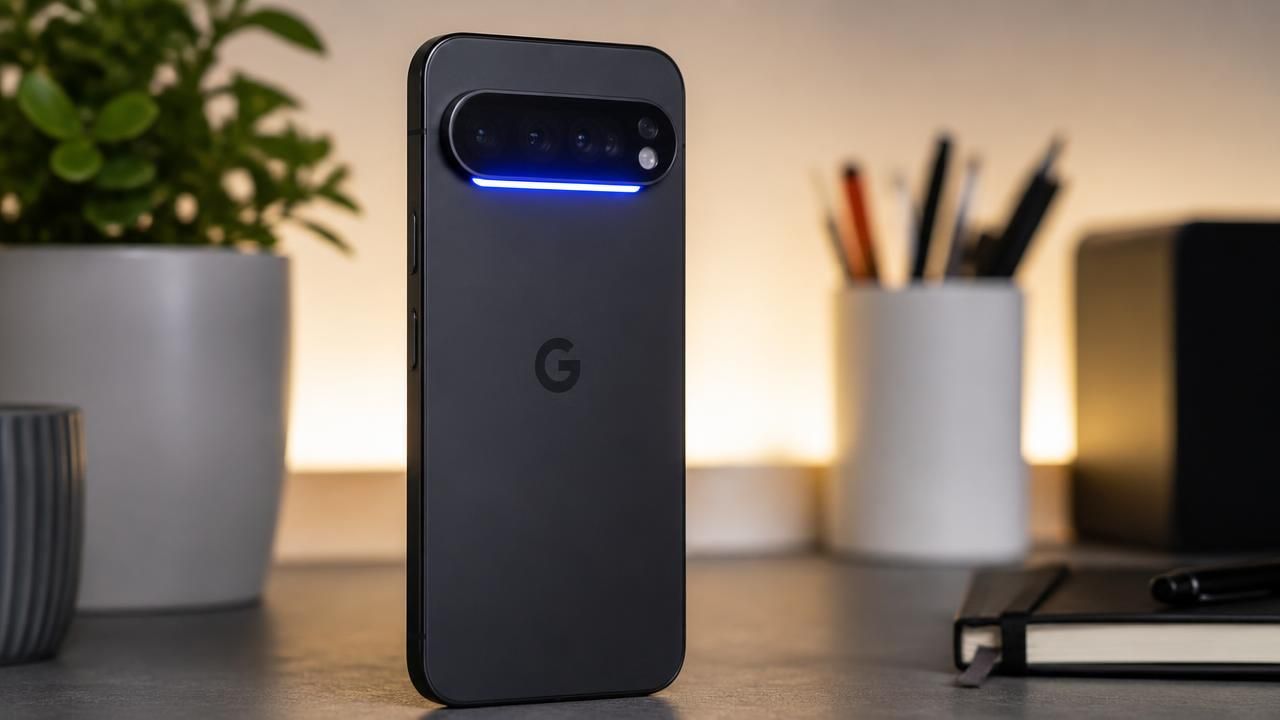
When Google unveiled the Pixel 11 Pro with its new HiLight notification LED, it seemed like a nostalgic nod to the days when every phone had a blinking light for alerts. But as reviewers and early adopters quickly discovered, Google’s implementation was oddly restrictive. Out of the box, the HiLight array only activates in two scenarios: when the phone is face down and you're interacting with Gemini, or when you receive a call from a favorite contact. And even then, it can only glow in one of five colors. For a feature that once defined the Android experience, it felt like a massive wasted opportunity.
Fortunately, the developer community has stepped in to do what Google wouldn't. A developer known as Dhananjay_Tech has released HiLight Studio, a third-party app that unlocks the full potential of the Pixel 11 Pro's HiLight LED. The app allows users to customize the LED for virtually any notification, from Slack messages to email alerts, and assign specific colors to different apps and contacts. The result: a feature that finally works the way it should have out of the box.
The HiLight Problem
The Pixel 11 Pro's HiLight is a strip of tiny LEDs located on the back of the phone, near the camera module. It's designed to provide glanceable notifications without needing to pick up the device. However, Google's initial software implementation was extraordinarily limited. The Verge called it "nearly useless," noting that the only two triggers are face-down Gemini interactions and favorite contact calls. Even those scenarios are constrained by a paltry palette of five colors.
This limitation is especially puzzling given the feature's history. Notification LEDs were a staple of Android phones for years, from the classic Nexus devices to early Samsung Galaxies. They provided a simple, at-a-glance way to know if you had messages without waking the screen. When Google embraced the trend toward always-on displays, the dedicated LED was phased out. Its return on the Pixel 11 Pro was met with excitement—but also with the realization that Google had severely neutered it.
Meet HiLight Studio
HiLight Studio, developed by the same X (formerly Twitter) user who goes by Dhananjay_Tech, is a straightforward yet powerful tool. It taps into the HiLight hardware directly, bypassing Google's limited settings. The app lets you assign custom colors to any app or contact, set different lighting patterns, and even control brightness. It also supports a "trigger" system that allows the LED to light up for any notification you choose, not just the two stock options.
AndroidHeadlines, in its coverage, emphasized that the app makes the Pixel 11 Pro's HiLight "work as it should have" from day one. The site's review praised the app for its ease of use and the fact that it unlocks the hardware without requiring root access or complex workarounds. Another AndroidHeadlines article highlighted the color selection feature specifically, noting how users can now assign distinct colors to different contacts—a feature that was conspicuously missing from Google's stock software.
Why This Matters
The backlash over HiLight's limited launch is part of a larger conversation about Google's tendency to ship hardware features in a half-finished state. The company has a history of launching products with promise, only to leave them undercooked until third-party developers step in. This was the case with the Pixel 4's Motion Sense, the Pixel 6's magic eraser (which later got a full rollout), and now the Pixel 11 Pro's HiLight.
For longtime Android fans, the notification LED is more than just a gimmick—it's a piece of nostalgia. Many users still remember the satisfaction of seeing a blinking green light on their old Nexus and knowing they had a new message. HiLight Studio taps into that sentiment while modernizing it with full color control and deep app integration.
MSN's coverage of the Pixel 11 series called HiLight "the one new feature that stands out," but noted that its initial implementation left much to be desired. The article speculated that Google might expand HiLight's functionality in a future software update, but until then, third-party apps like HiLight Studio fill the gap.
Perspectives Across the Web
"This is a massive wasted opportunity for a feature that used to be so beloved on older Android phones."
The Verge's take was harsh but accurate: Google's software simply doesn't do justice to the hardware. AndroidHeadlines, meanwhile, framed the third-party solution as the hero of the story, writing that HiLight Studio "makes the Pixel 11 Pro's HiLight work the way it always should have." MSN took a broader view, highlighting HiLight as a standout feature but acknowledging its initial limitations.
These differing framings illustrate a common narrative in tech: when a manufacturer ships a feature that feels incomplete, the community will often fix it faster than the company itself. It's a credit to the openness of Android that a hobbyist developer can step in and unlock hardware potential that Google left on the table.
What's Next?
For now, Pixel 11 Pro owners who want a proper notification LED experience should download HiLight Studio. The app is available through the developer's X profile and likely on third-party app stores. It is expected to be updated regularly, with support for more notification sources and settings over time.
As for Google, the message from users is clear: either fully embrace HiLight or let the community do it for you. If the company is smart, it will look at what developers like Dhananjay_Tech have built and consider integrating those features into the next software update. Until then, the HiLight Studio app proves that even the most underutilized hardware can shine—if you give the right developer access to it.