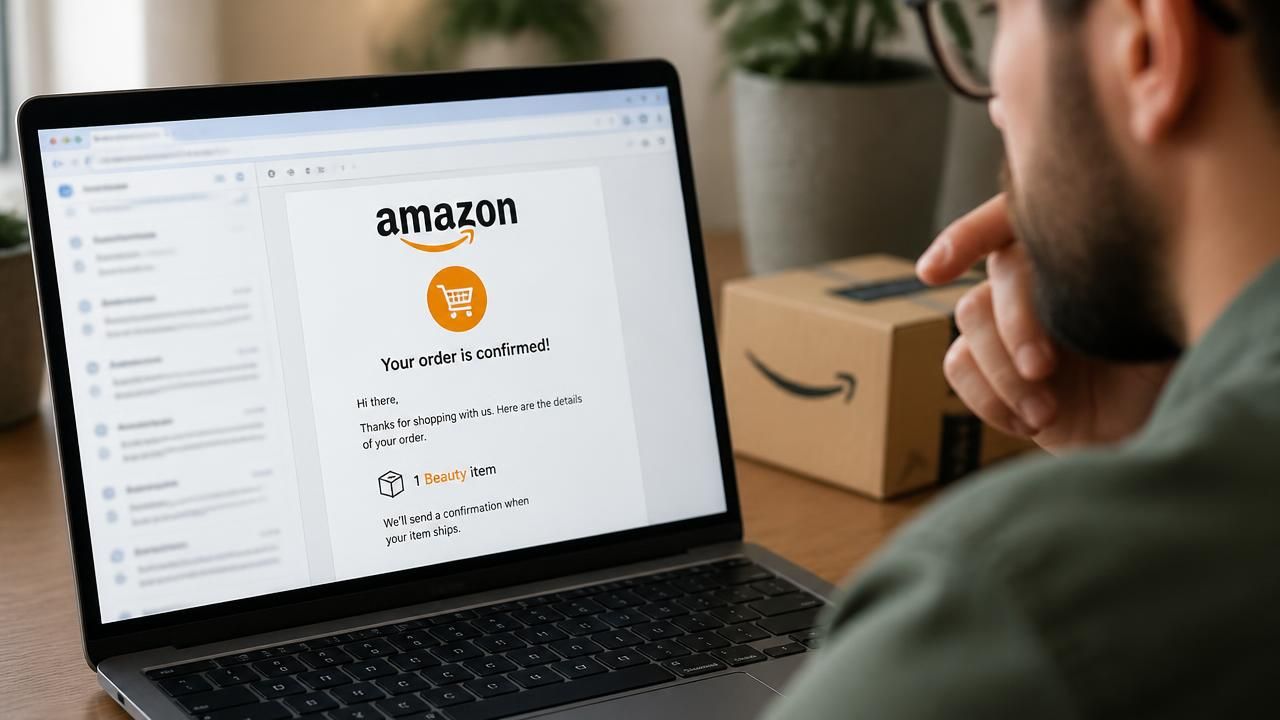
Earlier this summer, Amazon customers began noticing something odd about their order confirmation emails. Instead of listing the specific items they had purchased, the emails suddenly displayed only broad categories like “Your Beauty item is confirmed!” or “1 Hardware item.” This shift, reported by The Verge, was intended to streamline the email experience, but it has inadvertently created a golden opportunity for scammers. With the new generic format, it has become much easier for bad actors to craft fake “Scamazon” emails that blend in with the official ones, tricking even savvy shoppers into revealing personal information or downloading malware.
The timing couldn’t be worse. As Amazon rolls out this change, cybersecurity firms like Help Net Security are reporting a spike in vishing (voice phishing) attacks that begin with a counterfeit order confirmation email. The Guardian calls it “Scamazon,” a wave of fake emails targeting Prime subscribers with urgent claims about supposed order problems. These scams often lead victims to call a fake customer service number, where the attacker attempts to extract credit card details, passwords, or remote access to the victim’s computer.
A Perfect Storm: Vague Emails and Advanced AI Scams
The move to reduce email clutter is not just a minor UX tweak; it’s a dangerous gift to phishers. Previously, a shopper could spot a fake email immediately if the item names didn’t match. Now, a fake email that says “Your Electronics item is confirmed!” looks identical to a real one from Amazon. This confusion is compounded by another recent Amazon experiment: “Buy For Me,” an agentic AI feature that places orders on behalf of users from other websites. According to small business advocates on valueaddedresource.net, this AI feature has triggered backlash because it can lead to listing hijacking and makes it even harder for consumers to track what they purchased and from which seller. With AI-generated fake emails becoming more sophisticated, the line between legitimate and malicious communication is blurring faster than ever.
In Oklahoma City, the problem is exacerbated by physical delivery issues. As oklahoman.com reports, snowy and icy roads are causing USPS and Amazon package delays in the region. Scammers often use such delays as bait, sending emails that claim a package is stuck and requires the recipient to click a link to “resolve the issue.” These links may install ransomware or steal credentials.
How Scammers Are Exploiting the Chaos
The attacks take multiple forms. One common technique is vishing: the fake email instructs the victim to call a toll-free number to dispute a ($0.00) charge or to “verify” an order. The “representative” on the other end then convinces the victim to share login credentials, a one-time password, or even to download a screen-sharing app. CrowdStrike’s guide on spotting phishing emails highlights several red flags: urgency, unsolicited attachments, and offers that seem too good to be true. But with Amazon’s new vague language, the urgency is easier to fabricate. “If you receive an email that references an item you don’t recognize, but lists a category you’ve recently ordered from, it’s tempting to assume it’s legitimate,” says Jake Moore, a security expert quoted in The Guardian’s report. “That’s exactly what the scammers are counting on.”
Meanwhile, the Federal Trade Commission (FTC) has also been fielding complaints about unauthorized Amazon Prime charges. The FTC notes that many consumers are charged for Prime without their explicit consent, and scammers are now using Amazon’s official-looking emails to dupe users into providing payment details to “refund” those charges. The blurred lines between real and fake order confirmations make it harder for consumers to distinguish a legitimate Amazon notification from a phishing attempt.
How to Protect Yourself
Given this environment, experts advise taking a few extra steps before clicking any email from Amazon:
- Always navigate to Amazon manually. Don’t click links in emails; type the URL into your browser or use the official app to check order status.
- Check the sender’s full address. Legitimate Amazon emails come from addresses ending in @amazon.com, but scammers often use lookalike domains like @amazon-prime.com or @amzn-support.com.
- Be wary of phone calls. Amazon will not call you unsolicited. If you receive a call claiming to be Amazon, hang up and call the official customer service number.
- Look for verifiable order numbers. Even with generic category names, real emails will include a full order ID that matches the one on your account.
- Enable two-factor authentication (2FA). This adds a critical layer of protection even if your password is stolen.
What This Means for Amazon’s Brand
The shift to vague emails was likely a cost-cutting measure, allowing Amazon to reduce the personalization of its transactional messages. But it directly conflicts with Amazon’s core promise of convenience and trust. As the “Buy For Me” AI backlash shows, consumers are increasingly skeptical of Amazon’s use of artificial intelligence to automate decisions. The company is walking a tightrope between innovation and security, and this email change could be a step too far for some users.
In the short term, the best defense for Amazon is to help customers understand the new email format and to provide simple ways to verify the authenticity of a message. For now, however, the burden falls on the consumer to stay vigilant. As one Reddit user put it: “I now check every Amazon email as if it’s a phishing attempt — which is exactly what the scammers want me to think.”