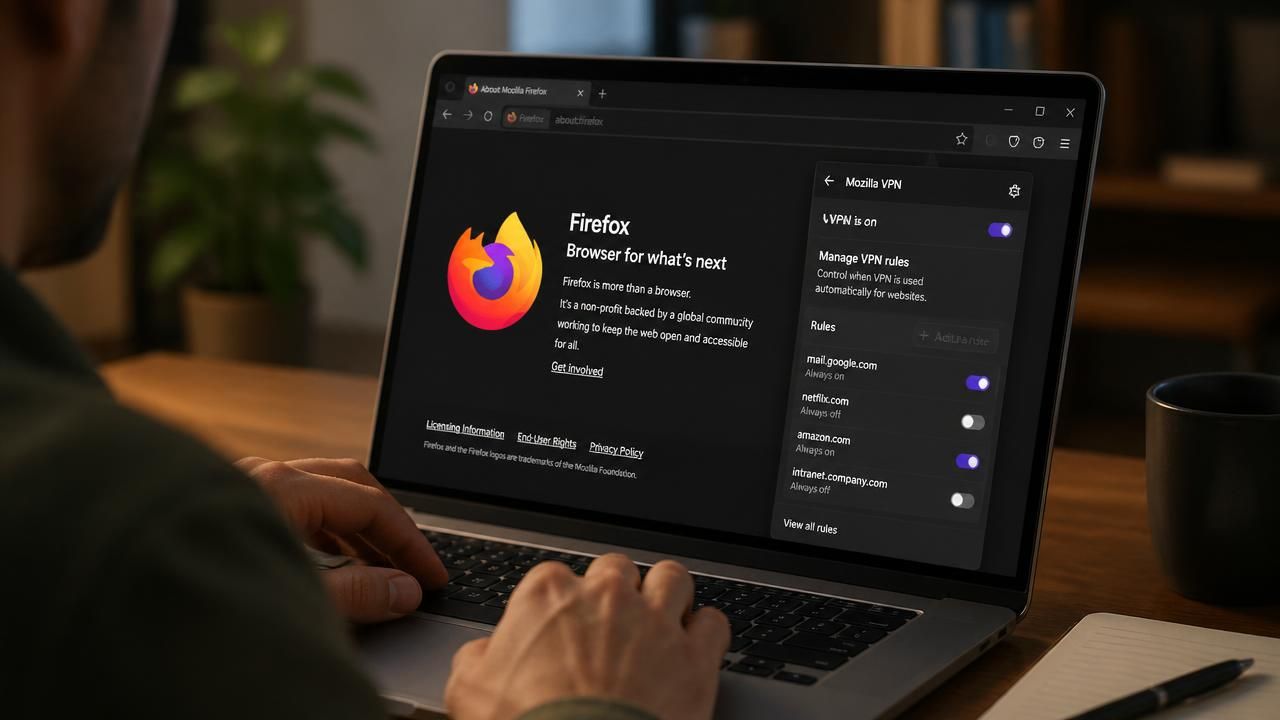
Mozilla shipped Firefox 161 on Tuesday, a release that quietly reframes the browser as a privacy control panel rather than just a window onto the web. The headline features: a new per-site rule system for Mozilla's built-in VPN, a toolbar-level data-wiping button called "Fire," and a concerted push to make the company's virtual private network free — and in some form, unlimited — across more platforms.
Per-Site VPN Rules Arrive
According to The Verge, the marquee addition is a setting that lets users decide which pages automatically load with the browser's VPN active. Accessed through the "Manage VPN rules" option in Firefox's VPN panel, the feature allows a site to be set to "always on" or "always off," eliminating the need to manually toggle the connection every time a particular page is visited.
The logic is pragmatic. Many users want encryption for banking portals, personal email, and news sites, but need a direct connection for streaming services, corporate intranets, or regional sites that block VPN traffic. Per-site rules turn that decision into a one-time configuration rather than a recurring chore — a pattern already familiar from extensions like uBlock Origin, where rules persist invisibly in the background.
Phoronix also notes that Firefox 161 introduces a new Classic Themes section, part of Mozilla's ongoing effort to restore the deep interface customization that longtime users have lamented losing since the Quantum redesign of 2017.
The 'Fire' Button: One-Click Cleanup
Starting Tuesday, Mozilla is also rolling out a "Fire" button in standard Firefox windows that clears browsing data directly from the toolbar. Users can choose precisely which categories are erased — including browsing history, download history, cookie data, site data, temporary files, and saved form entries.
The feature is a consumer-friendly evolution of the existing "Clear Recent History" dialog, which has lived in menus for years but is rarely used by typical users. By surfacing it as a single click, Mozilla is betting that people want a panic button for shared computers, borrowed laptops, and privacy-sensitive sessions.
"You can choose which data it deletes, including browsing history, downloads history, cookie data, site data, temporary files, saved form information" — The Verge, describing the new Fire button's configuration options.
The Free VPN Question: 50GB or Unlimited?
The most consequential — and most confusingly reported — part of the story concerns Firefox's VPN economics. Betanews reports that Firefox now includes a free built-in VPN with 50GB of monthly data. Meanwhile, MSN and Technobezz both report that the free VPN has no data cap through January 2027 — a promotional unlimited-data window — and that Mozilla is now extending the free VPN to Android users.
The apparent contradiction likely reflects the same underlying offer described at different layers: a baseline free tier once anchored at 50GB per month, now temporarily lifted to unlimited as part of a promotional campaign running through January 2027. Mozilla has used similar time-boxed promotions to seed adoption before converting users to paid plans, a strategy that mirrors the freemium playbooks of Dropbox, Spotify, and Proton.
Either way, the direction is unmistakable: Mozilla is moving the VPN from a paid add-on to a default expectation of the browser, and it is doing so on Android, where mobile browsing dominates and where privacy-conscious users have been underserved by free VPN options.
Android Gains More Than VPN
Technobezz notes that the Android release also brings a Read-Aloud feature, letting users have page content spoken aloud — an accessibility win that also makes Firefox more competitive on long-form reading against dedicated apps like Pocket and Instapaper.
Why It Matters
Mozilla occupies a shrinking slice of the browser market, trailing Chrome, Safari, and Edge. Its differentiation strategy has increasingly centered on privacy — a positioning reinforced by features like Total Cookie Protection and now per-site VPN rules and the Fire button.
The strategic logic cuts two ways. On one hand, bundling a VPN into a browser makes privacy frictionless and could pull users away from Chrome, where VPN features are absent or gated. On the other hand, Mozilla's VPN runs on infrastructure from its subsidiary Mozilla VPN (built on Mullvad's WireGuard network), raising real questions about cost, scalability, and whether "unlimited" can be sustained past January 2027 without new revenue.
Security researchers have long warned that free VPNs often monetize through data collection. Mozilla's strongest selling point is the opposite promise: a no-logs service backed by a nonprofit. If that promise holds through an unlimited-data promotion, it would be one of the most aggressive privacy offers in consumer software.
The Bigger Picture
Firefox 161 is best read as a bundle of small, friction-reducing privacy tools rather than a single dramatic release. Per-site VPN rules, a one-click wipe button, Read-Aloud on Android, and a restored Classic Themes section all point to the same philosophy: privacy should be a default state rather than a menu-diving exercise.
Users can expect the update to roll out gradually, with the Fire button appearing in standard windows and the VPN rules panel available wherever Firefox's VPN is offered. Whether "unlimited through January 2027" becomes a permanent feature — or a limited-time experiment whose terms shift once the promotional window closes — is the question Mozilla hasn't fully answered. For now, the company is making its most aggressive case yet that the browser itself should be your privacy layer.