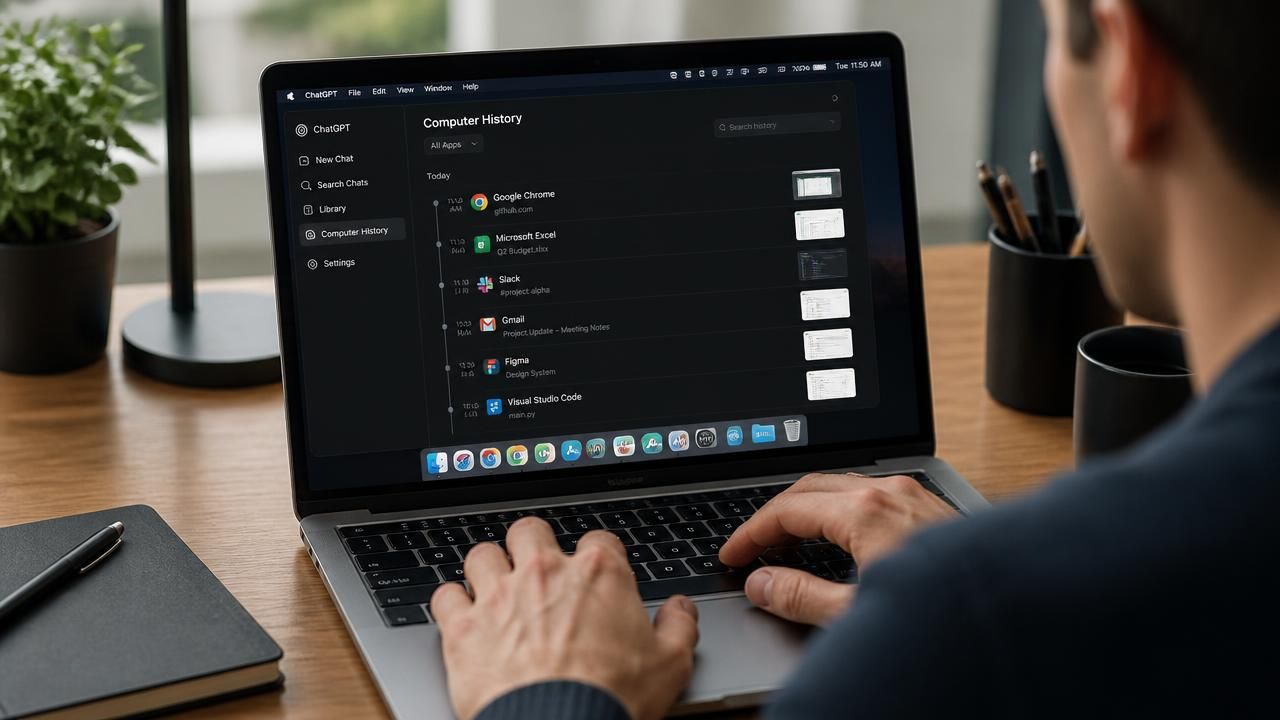
OpenAI has quietly introduced a new feature for the ChatGPT desktop app on macOS called Computer History, which turns your on-screen activity into a searchable timeline that the AI can reference to learn your habits, suggest automations, and even pick up tasks you left half-finished. The feature, announced by OpenAI product and engineering manager Ari Weinstein on X, is currently rolling out to users and has already sparked a fresh wave of debate about the trade-offs between convenience and privacy.
What Is Computer History?
Computer History is an opt-in feature in the ChatGPT macOS app that records your activity—including clicks, keystrokes, and the apps and websites you use—into a chronological timeline. According to The Verge, this timeline is stored locally and can be referenced by ChatGPT and Codex when you ask for help. For example, if you were mid-way through editing a spreadsheet or drafting an email, ChatGPT could pick up where you left off, using the captured context to offer relevant suggestions.
Weinstein explained on X that the feature is designed to "learn how you work" and "suggest automations" based on patterns in your activity. In that sense, it goes beyond simple memory and moves toward proactive assistance. The company has stressed that Computer History is entirely opt-in—not the default—and that users can exclude specific apps or websites from being tracked, as well as delete individual entries from the timeline.
How It Compares to Microsoft's Recall
Tech observers have been quick to compare Computer History to Microsoft's Windows Recall, a controversial feature that also takes periodic screenshots of a user's screen to create a searchable visual timeline. Recall, which was delayed and revised after privacy outcry, faced criticism for storing sensitive data insecurely. Memeburn notes that Computer History differs in key ways: it doesn't rely on screenshots but rather on metadata like clicks and keystrokes, and it explicitly ignores content in incognito or private browser tabs.
Yet the underlying concept is similar: an AI assistant with a persistent record of what you do on your computer. This raises the same fundamental question—how much should an AI know about your digital life to be genuinely useful? As one analyst put it, "The tension is between a genuinely helpful assistant and a silent observer."
Privacy Concerns: Plain Text Storage and Granular Control
The Next Web raised a red flag by reporting that Computer History stores logged data in plain text on the local machine. While that doesn't mean the data is instantly sent to OpenAI, it does mean that anyone with access to your Mac (or malware that penetrates it) could potentially read the timeline. OpenAI, for its part, has not commented directly on the plain-text storage beyond saying that users can clear history at any time.
To allay concerns, the feature includes multiple layers of control:
- Opt-in activation: No automatic tracking unless you explicitly enable it.
- App and website exclusions: You can blacklist certain programs or domains.
- Selective deletion: Individual timeline entries can be removed.
- Incognito/private browsing is ignored by default.
Still, privacy advocates argue that even optional features create pressure to participate, especially when they power features like "pick up where I left off." As Cult of Mac's headline bluntly put it, "ChatGPT just learned to watch everything you do on your Mac."
Why This Matters for AI and Productivity
OpenAI clearly sees Computer History as a stepping stone toward a more agentic AI—one that doesn't just wait for prompts, but understands your context and acts proactively. The Verge noted that this data can also be used to improve OpenAI's models, making the user's activity part of training data. For power users who spend hours in code editors or design tools, the potential productivity boost is significant: no more re-explaining your project to ChatGPT; it already sees the state of your work.
But this level of integration also marks a shift in how AI companies gather data. Previously, most tracking happened in the cloud—through browser extensions or API calls. Computer History moves the tracking directly into the operating system, making it more intimate and, for some, more unsettling.
What the Experts Say
"It's a double-edged sword," said Dr. Elena Martinez, a computer ethics researcher at Stanford. "On one hand, this is the natural evolution of AI assistants. On the other, we're normalizing the idea that an AI should have a transcript of everything we do on our machines. The fact that it's opt-in is good, but checkboxes are not the same as informed consent. Users need to understand exactly what data is collected and how long it stays on disk."
OpenAI's Ari Weinstein defended the feature on X, writing: "Computer History only activates when you choose to enable it, and we built in controls that put you in charge of what gets captured. Our goal is to make your AI context-aware without compromising your autonomy."
How to Get Started
If you're using the ChatGPT macOS app, look for the Computer History setting in the app's preferences. From there, you can enable or disable it, manage exclusions, and review the timeline. The rollout appears to be gradual, so if you don't see it yet, it may be arriving in the next few days. There is no word yet on when or whether Computer History will come to Windows or mobile.
The Bottom Line
Computer History represents a bold bet by OpenAI that the next frontier of AI is contextual memory. It also reignites a conversation that will only grow louder as AI systems become more embedded in our daily lives. For now, the feature is a test not just of technology, but of trust—and users will decide whether the convenience of an AI that truly "gets you" is worth the price of having it watch.