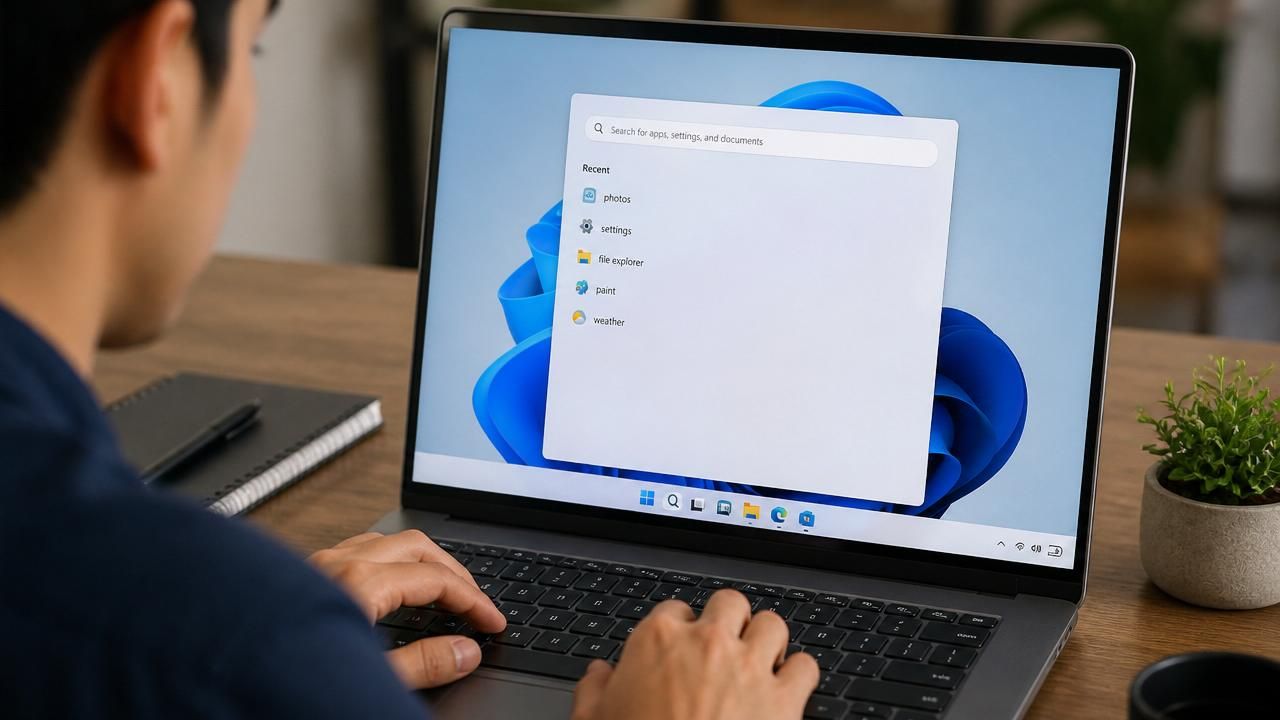
Microsoft is rolling out a cleaner, ad-free version of the Windows 11 search menu to Windows Insiders, signaling a major shift in the company's approach to user experience. The update, announced in a blog post on Monday, strips the search homescreen of recommended content, daily quizzes, trending searches, and game recommendations, replacing them with a simple list of recent searches. This move is part of a broader effort to rebuild trust with users who have long criticized Windows 11 for its intrusive ads and bloatware.
A Decluttered Search Experience
The Verge reports that the experimental search box, currently available to Insiders in the Experimental channel, removes the distracting tiles that previously occupied the right pane. Instead, users will see only their recent searches, making the feature more functional and less commercial. This change addresses one of the most common complaints about Windows 11: the cluttered and ad-heavy interface. Tom's Hardware notes that while the new search box is a welcome improvement, the AI integration Microsoft has been touting remains largely superficial. “The AI features are more hype than substance,” the outlet argues, pointing out that the core search functionality still relies on traditional indexing rather than advanced machine learning.
Copilot Installation and AI Features
Meanwhile, Microsoft is pushing its AI assistant, Copilot, onto Windows systems. According to gHacks.net, the Copilot app will install automatically for many users, though there are exceptions. This automatic installation has drawn criticism from users who prefer to control what software runs on their machines. However, Microsoft is also testing new AI-powered tools, such as the “Click To Do” feature that adds a “describe image” option, allowing users to analyze content in photos. This feature, detailed by gHacks.net, uses AI to generate descriptions of images, potentially aiding accessibility and productivity.
Passkey Management and App Removal
In addition to search and AI changes, Microsoft is enhancing security and user control. gHacks.net explains how to use and manage passkeys in Windows 11, a password-less authentication method that is gaining traction. Meanwhile, Betanews reveals that Windows 11 25H2 will include a new option to remove all unwanted Microsoft apps, giving users more control over their system. This is a significant step forward for users who have long complained about the inability to uninstall built-in apps like Cortana, Xbox, or even the new Copilot.
Industry Reactions and Context
The changes come amid a broader trend of Microsoft listening to user feedback. Windows 10 version 1903, as highlighted by gHacks.net, introduced several major features that set the stage for these updates, including a streamlined Settings app. However, the same outlet notes that the new Apps & Features section in Settings is still no replacement for the traditional Programs & Features in Control Panel, indicating that Microsoft's modernization efforts are still incomplete.
Tech experts are divided on the significance of these updates. Some applaud the removal of ads from search, calling it a long-overdue fix. Others question whether the AI features are genuinely useful or just marketing gimmicks. “The real test will be whether these changes improve daily workflows or just add complexity,” says one analyst. The automatic installation of Copilot has also raised privacy concerns, with users worried about data collection.
What This Means for Users
For the average Windows user, these updates promise a less intrusive experience. The cleaner search box is a step toward reducing visual clutter, while the ability to remove unwanted apps gives users more freedom. Passkey support enhances security, and AI features like image description could help with accessibility. However, the forced installation of Copilot may alienate some users who prefer a more traditional Windows environment.
As Microsoft continues to test these features with Insiders, the final rollout to the general public is expected later this year. The company is walking a tightrope between innovation and user satisfaction, and these changes will likely shape the perception of Windows 11 for years to come.